Overview
A Temporary Work Assignment (TWA) with a rate increase may be requested when an employee assumes a temporary change in responsibilities such as a temporary assignment while the unit is recruiting for a permanent position; an assignment of an unusual, short-term or non-recurring nature; or a temporary administrative or work assignment. The new temporary responsibilities should align with the Standard Job Description (SJD) of the position the employee currently holds; otherwise a new position may need to be created. Per the Salary Administration Guidelines, it may be necessary for employees to assume additional and/or different responsibilities for a temporary period, typically no less than 90 and no more than 180 calendar days.
For a temporary change in responsibilities, the current responsibilities are shifted so that the employee maintains no more than a 100% FTE; if the employee is not shifting their current responsibilities and will work over 100% FTE, then the change should be processed as an Overload.
For grant-funded employees with a TWA, if the work of the TWA is not related to a grant, assign the TWA to non-sponsored funds (Program Project or Gift), since it is not work performed in the furtherance of a specific sponsored project.
Required Documentation
- Justification Documentation: All temporary change in responsibilities with a rate increase requests must include justification documentation outlining evidence for the need. The justification documentation should include:
- A list of the current responsibilities with a comparison list of the proposed responsibilities; and
- Explanation of how the change in responsibilities came to be; and
- Evidence of truly new responsibilities - not just more of the same; and
- If interim responsibilities, must have evidence that the new responsibilities are only a portion of another position.
- Organizational Chart: If the change involves changes in reporting structure, a proposed org chart should be attached.
Processing in Workday
A temporary change in responsibilities is processed as a Temporary Work Assignment (TWA) allowance in Workday. A TWA allowance is similar to a temporary increase in the worker’s base compensation rate, except in Workday the base compensation and Temporary Work Assignment are entered and maintained separately. Additionally, a TWA will not pay to an employee who is on a leave of absence.
A temporary change in responsibilities is processed in Workday by either a Job Change or Compensation Change, depending on whether the employee has an SJD. Employees who do not have an SJD include all employees in Job Groups Category C, Faculty, Instructional Category, as well as some in Job Groups Research and Executive. Check the Titles with No SJD for a full list of titles.
While it’s uncommon for a position to have more than one TWA, the "Temporary Work Allowance, Multiple (Amount)" reason could be used if more than one amount-based TWA is needed (maximum of two TWAs).
The Compensation Center of Excellence (CCoE) reviews and approves all TWA requests. The CCoE (Compensation Partner (Local)) is automatically routed the TWA transaction in Workday.
An end date should always be included for a TWA, up to one year at a time.
Note: Temporary Work Assignment Amounts are prorated based on the effective dates; they do not prorate based on FTE.
Summer TWAs for 9-Month (Academic) Employees: TWAs cannot process on a position with a Summer compensation basis. If a 9-Month employee who is working during the summer should continue their temporary responsibilities, then the allowance amount will either need to be incorporated into the summer position's base salary, or a separate position should be created for the TWA amount; if the position is grant-funded, then a separate position is required for the TWA for effort reporting.
Add New Allowance - For employees with an SJD
Overview
For Academic Staff and University Staff who have a Standard Job Description (SJD), a request for a temporary change in responsibilities with a rate increase are processed as a Job Change in Workday. This document explains how to process the Job Change, including changing the temporary responsibilities as a unique responsibilities and attaching a justification.
Who Can Initiate?
Generally the HR Process Coordinator (Supervisory) UW will initiate this process. A list of all security roles able to initiate include:
- Compensation Partner (Local)
- Compensation Partner (Supervisory)
- HR Executive (Local)
- HR Executive (Supervisory)
- HR Partner (Local)
- HR Partner (Supervisory)
- HR Process Coordinator (Supervisory) UW
Processing Change in Workday
The steps below outline how to process a temporary change in responsibilities with a rate increase request (for Academic Staff and University Staff who have an SJD).
See the Business Process Map for Job Changes for the full approval process.
| Step 1: Find Employee |
From the Workday landing page, enter the employee's name in the search box and select the employee. |
|---|---|
| Step 2: Start Job Change |
Once you are in the employee's Worker Profile:
|
| Step 3: Enter Details in 'Start Job Change' |
|
| Step 4: Add Plan Assignment |
|
| Step 5: Enter Allowance Plan Assignment |
Enter information in the Add Allowance Plan Assignment section:
|
| Step 6: Review and Submit |
*Note: Justification documentation is required for a temporary change in responsibilities. The justification documentation can be uploaded as an attachment and should include:
|
| Step 7: Review & Approval by Other Security Roles |
After the temporary change in responsibilities and rate change are submitted, will be sent for review and approval by those with the following security role:
|
| Step 8: Update Job Responsibilities |
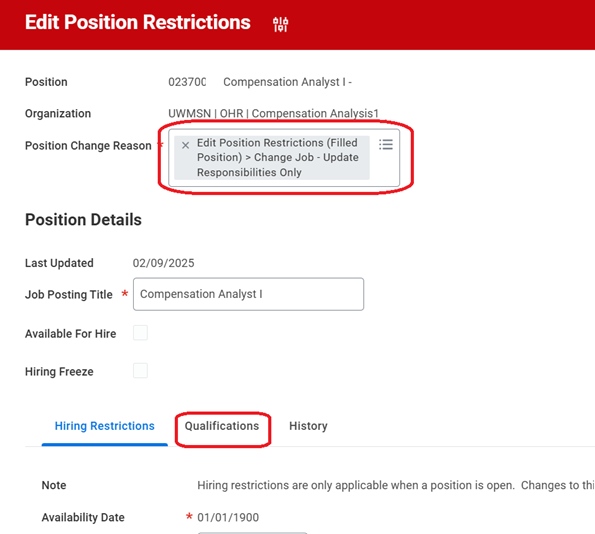
After the HR Partner (Supervisory) reviews and approves, they will need to Edit Position Restrictions. If the To Do task is not automatically kicked off, then you may need to search for the business process directly in the Workday search bar.
After the temporary change in responsibilities and rate change are approved in Workday, the initiator, and the manager receive notifications.
|



Add New Allowance - For employees without an SJD / Edit Existing Allowance - For all employees
Overview
For employees who don't have a Standard Job Description (SJD), a request to temporary change in responsibilities with a rate increase are processed as a Temporary Work Allowance (TWA) in Workday. This document explains how to process a TWA via the Compensation Change process, including uploading the list of temporary responsibilities and justification as an attachment.
Employees who do not have an SJD include all employees in Job Groups Category C, Faculty, Instructional Category, as well as some in Job Groups Research and Executive. Check the Titles with No SJD for a full list of titles.
Who Can Initiate?
- Compensation Partner (Local)
- Compensation Partner (Supervisory)
- HR Executive (Local)
- HR Executive (Supervisory)
- HR Partner (Local)
- HR Partner (Supervisory)
- HR Process Coordinator (Supervisory) UW
Processing Change in Workday
The steps below outline how to process a temporary change in responsibilities with a rate increase request for employees with no SJD. Additionally, these steps outline how to process any edits made to the TWA for all employees (both with and without SJD).
After the temporary change in responsibilities and rate change are approved in Workday, the initiator, and the manager receive notifications. Additionally, the Cost Center Accounting Specialist (CCAS) receives notification that a 'Worker' received a change to their current allowance plan. The CCAS can make an adjustment to the costing allocation, if applicable.
See the Business Process Map for Compensation Changes for the full approval process.
| Step 1: Find Employee |
From the Workday landing page, enter the employee's name in the search box and select the employee. |
|---|---|
| Step 2: Request Compensation Change |
Once you are in the employee's Worker Profile:
|
| Step 3: Enter Allowance |
Scroll to the Compensation section :
*Note: Justification documentation is required for a temporary change in responsibilities. The justification documentation can be uploaded as an attachment and should include:
|
| Step 4: Review & Approval by Other Security Roles |
After the temporary change in responsibilities and rate change are approved in Workday, the initiator, and the manager receive notifications.
|

Edit/End Existing Allowance
Overview
Occasionally, updates may be required for a previously approved Temporary Work Allowance (TWA), such as changes to the payment amount, end date, or payment frequency.
Employees who require changes to their temporary responsibilities should follow the steps outlined in the Business Process Map for Compensation Changes.
Who Can Initiate?
- Compensation Partner (Local)
- Compensation Partner (Supervisor)
- HR Executive (Supervisory)
- HR Partner (Supervisory)
- HR Process Coordinator (Supervisory) UW
- Shared Services-Compensation UW
- Shared Services-Human Resources UW
Processing Compensation Change in Workday
Modifying an existing TWA can either be processed through 'Request Compensation Change' (or 'Job Change' if modifications also need to be made to responsibilities listed in the position description).
If changes need to be made to the temporary responsibilities listed in the position description, then the request can be initiated via 'Job Change'. Processing instructions are listed above under the 'Add New/Edit Allowance - For employees with an SJD' section.
- NOTE: If you are ending a TWA, then you will also need to remove the additional responsibilities either through a To Do Task, or as a stand-alone business process (Edit Position Restrictions).
If changes do not need to be made to the position description, only the TWA amount and/or end date, then the request can be initiated via 'Request Compensation Change'. Processing instructions are listed above under the 'Add New/Edit Allowance - For employees without an SJD' section.
For ending the TWA when an employee transfers to a new position, the TWA can either be ended as a stand-alone process, or it can be ended when hiring the new employee into the new position.
After the change is approved in Workday, the initiator, and the manager receive notifications. Additionally, the Cost Center Accounting Specialist (CCAS) receives notification that a 'Worker' received a change to their current allowance plan. The CCAS can make an adjustment to the costing allocation, if applicable.
See the Business Process Map for Compensation Changes for the full approval process.
How Payments are Calculated
Overview
All allowance plans are paid based on the frequency configured for each plan. TWAs do not prorate based on FTE, but they do prorate based on effective dates.
Annual: Set amount divided by the number of pay periods. The amount entered into the Allowance Plan Assignment would be the annual TWA amount, prorated to the FTE.
- 9-Month position: (Annual Allowance Amount * FTE) / 19.5 pay periods
- 12-Month position: (Annual Allowance Amount * FTE) / 26 pay periods
Hourly: Amount paid per hour determined by worker's timesheet
Scenarios in Workday
The following scenarios illustrate how the Temporary Work Assignment (TWA) and compensation are calculated in Workday.
Scenario A - Amount (12-Month)
Scenario A
Employee A is a full-time (100% FTE) employee with an annualized base salary at $95,000/12-Month. They are beginning new temporary responsibilities providing them with a TWA of $5,000 for the year with effective dates from 6/28/2026 through 6/26/2027.
If a full-time, 12-Month salaried worker is given the $5,000 TWA, they will receive an allowance of $192.31 each biweekly pay period ($5,000/26 pay periods), in addition to their base salary, until the end date of the allowance plan.
TWA Allowance to Enter in Workday:
Amount: $5,000
Compensation Plan: Temporary Work Assignment Supplement Amount
| Base | Allowance | Total | |
|---|---|---|---|
|
Total Base Salary & Allowance (what is entered in Workday) |
$95,000 | $5,000 | $100,000 / 12-Month |
| Total Biweekly Amount | $3,653.84 | $192.31 | $3,846.15 / Biweekly |
| Total Amount Paid (26 Pay Periods) | ~$95,000 | ~$5,000 | ~$100,000 |
Scenario B - Amount (9-Month)
Scenario B
Employee B is a full-time (100% FTE) employee with an academic base salary at $75,000/9-Month. They are beginning new temporary responsibilities providing them with a TWA of $10,000 for the academic year with effective dates from 8/17/2026 through 5/16/2027.
If a full-time, 9-Month salaried worker is given the $10,000 TWA, they will receive an allowance of $512.82 each biweekly pay period ($10,000/19.5 pay periods), in addition to their base salary, until the end date of the allowance plan.
Note: TWAs cannot process on a position with a Summer compensation basis. If a 9-Month employee who is working during the summer should continue their temporary responsibilities, then the allowance amount will either need to be incorporated into the summer position's base salary, or a separate position should be created for the TWA amount; if the position is grant-funded, then a separate position is required for the TWA for effort reporting.
TWA Allowance to Enter in Workday:
Amount: $10,000
Compensation Plan: Temporary Work Assignment Supplement Amount
| Base | Allowance | Total | |
|---|---|---|---|
|
Total Base Salary & Allowance (what is entered in Workday) |
$75,000 | $10,000 | $85,000 / 9-Month |
| Total Biweekly Amount |
$1,923.08 (Paycheck 1) $3,846.15 (Paychecks 2-20) |
$256.41 (Paycheck 1) $512.82 (Paychecks 2-20) |
$2,179.49 / Biweekly (Paycheck 1) $4,358.97 / Biweekly (Paychecks 2-20) |
| Total Amount Paid (19.5 Pay Periods) | ~$75,000 | ~$10,000 | ~$85,000 |
Scenario C - Amount (Hourly)
Scenario C
Employee C is a full-time (100% FTE) employee with an hourly base rate set at $25.00 per hour. They are beginning new temporary responsibilities providing them with a TWA of $5.00/hour with effective dates from 6/28/2026 through 6/26/2027.
If a full-time hourly worker is given the $5.00/hour TWA, they will receive an allowance of $5 per hour for every hour recorded on their timesheet until the end date of the allowance plan; if they work 80 hours in a biweekly pay period, they will get paid $400 each biweekly pay period ($5.00 * 80 hours) for the TWA, along with their base rate, until the end date of the allowance plan.
TWA Allowance to Enter in Workday:
Amount: $5.00
Compensation Plan: Temporary Work Assignment Supplement Amount
| Base | Allowance | Total | |
|---|---|---|---|
|
Total Hourly Base Rate & Allowance (what is entered in Workday) |
$25.00 | $5.00 | $30.00 / Hour |
| Total Biweekly Amount | $2,000.00 | $400.00 | $2,400.00 / Biweekly |
| Total Amount Paid (26 Pay Periods) | ~$52,000 | ~$10,400 | ~$62,400 |
Scenario D - Prorated to Effective Dates
Scenario D
Employee D is a full-time (100% FTE) employee with an annualized base salary at $80,000/12-Month. They are beginning new temporary responsibilities providing them with a TWA of $10,000 with effective dates from 6/28/2026 through 12/26/2026 (13 pay periods).
If a full-time, 12-Month salaried worker is given the $10,000 TWA, they will receive $384.62 each biweekly pay period ($10,000/26 pay periods), in addition to their base salary, until the end date of the allowance plan. With effective dates from 6/28/2026 to 12/26/2026 (13 pay periods), that would provide a full TWA amount of $5,000.06 ($384.62 * 13 biweekly pay periods).
TWA Allowance to Enter in Workday:
Amount: $10,000
Compensation Plan: Temporary Work Assignment Supplement Amount
| Base | Allowance | Total | |
|---|---|---|---|
|
Total Base Salary & Allowance (what is entered in Workday) |
$80,000 | $10,000 | $90,000 / 12-Month |
| Total Biweekly Amount | $3,076.92 | $384.62 | $3,461.54 / Biweekly |
| Total Amount Paid (13 Pay Periods) | ~$40,000 | ~$5,000 | ~$45,000 |
Scenario E - Part-Time <1.0% FTE
Scenario E
Employee E is a part-time (50% FTE) employee with an annualized base salary at $100,000/12-Month. They are beginning new temporary responsibilities providing them with a TWA of $10,000 with effective dates from 6/28/2026 through 6/26/2027.
If a 50% 12-Month salaried worker is given the $10,000 TWA, they will receive $192.31 each biweekly pay period (($10,000 * .50)/26 pay periods), in addition to their base salary, until the end date of the allowance plan. At a 50% FTE, the employee would expect to receive an allowance of $5,000 through the year. The total amount must be calculated outside of Workday as allowances will not prorate based on FTE.
TWA Allowance to Enter in Workday:
Amount: $5,000
Compensation Plan: Temporary Work Assignment Supplement Amount
| Base | Allowance | Total | |
|---|---|---|---|
|
Total Base Salary & Allowance (what is entered in Workday) |
$100,000 |
$5,000 ($10,000 prorated to 50% FTE) | $105,000 / 12-Month |
| Total Biweekly Amount | $1,923.08 | $192.31 | $2,115.39 / Biweekly |
| Total Amount Paid (26 Pay Periods) | ~$50,000 | ~$5,000 | ~$55,000 |
Additional Resources
- Pay Adjustment Justification Matrix
- Payment for Additional Temporary or One Time Work
- Position Description Change Decision Tree
- Salary Adjustments, UW-5023
- Salary Administration Guidelines
- Template Justification for Salary Adjustment
Questions?
Contact compensation@ohr.wisc.edu.